小猪生活
首页
美食营养
生活百科
知识问答
生活知识
返回
小猪生活
首页
美食营养
游戏数码
手工爱好
生活知识
生活百科
健康养生
运动户外
职场理财
情感交际
母婴教育
时尚美容
知识问答
更多知识
搜索
Illustrator怎么制作上平下凹的拱形字?
2026-05-05 08:26:46
1、在Illustrator画板上输入需要的文字。
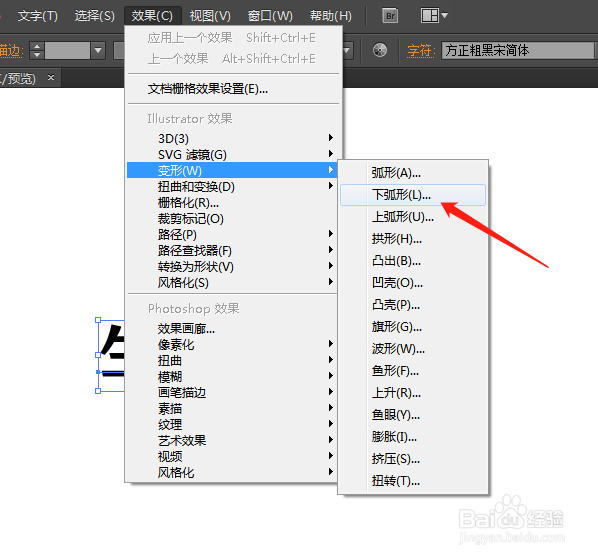
2、点击效果-变形-下弧形。
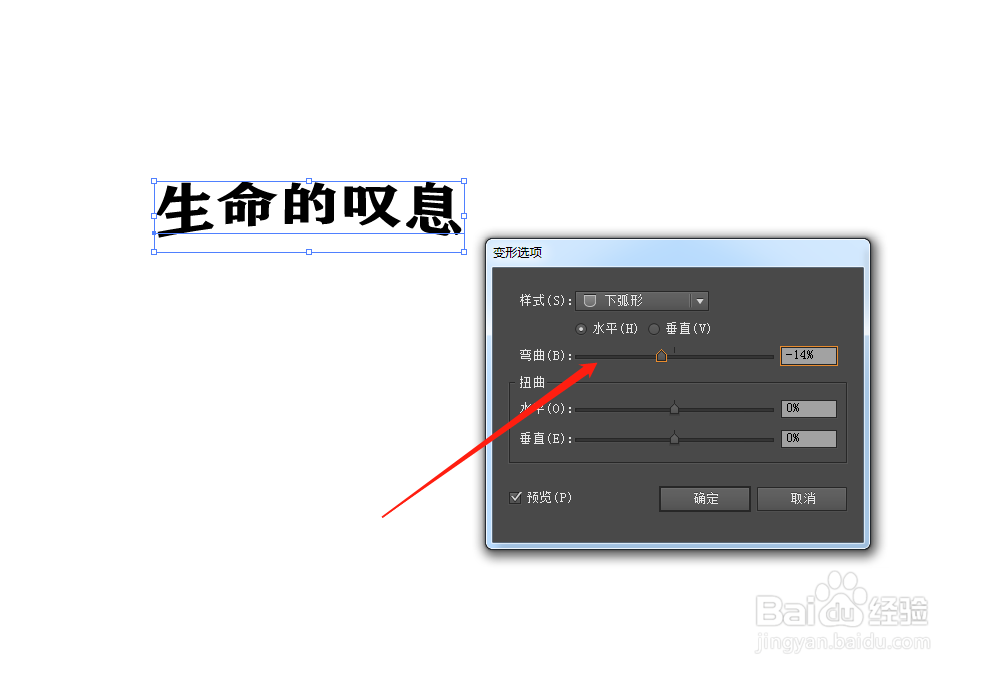
3、向左调整弯曲的弧度参数。
4、选择需要的文字颜色,最终效果如图,上平下凹的拱形字就完成了。
相关推荐
AI如何使用变形工具?
阅读量:105
AI(Adobe Illustrator)顶层对象建立封套扭曲
阅读量:114
ai中怎么水平翻转,ai翻转图形,
阅读量:44
AI路径文字工具如何使用?
阅读量:135
如何在AI里添加“粗糙蜡笔”艺术效果?
阅读量:72
猜你喜欢
定速巡航怎么用
电脑怎么一键还原
筢怎么读
怎么给照片换背景
中国移动怎么查积分
小孩湿疹怎么办
显卡怎么超频
卷尺怎么看
脂肪瘤怎么治疗
便血怎么回事
猜你喜欢
怎么注册域名
大众汽车怎么样
用电饭锅怎么做蛋糕
怎么治疗灰指甲
大便次数多是怎么回事
网络不稳定怎么办
天猫魔盒怎么看电视直播
被仓鼠咬出血怎么办
win7怎么截屏
蛋疼怎么办