小猪生活
首页
美食营养
生活百科
知识问答
生活知识
返回
小猪生活
首页
美食营养
游戏数码
手工爱好
生活知识
生活百科
健康养生
运动户外
职场理财
情感交际
母婴教育
时尚美容
知识问答
更多知识
搜索
PSPad editor怎么设置语言为中文
2026-05-01 23:03:41
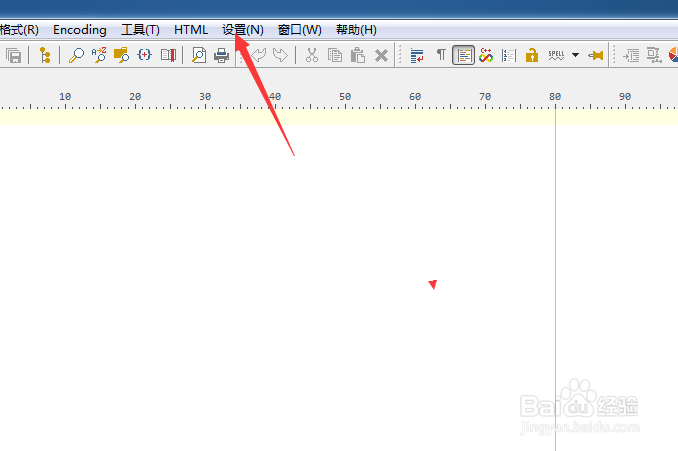
1、点击PSPad editor菜单中的设置菜单
2、弹出了下拉菜单选中为首选项
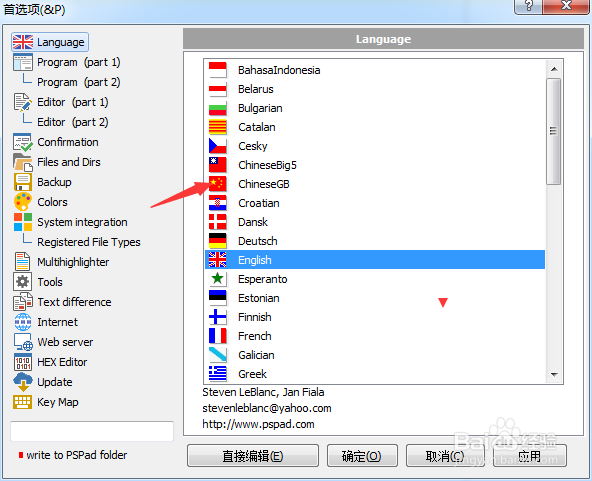
3、点击language选项
4、点击ChineseGB选项
5、点击ChineseGB选之后,点击确定
相关推荐
labview2013安装激活教程
阅读量:104
简单解析PHP程序的运行流程
阅读量:88
ubuntu mate桌面取消桌面显示挂载的硬盘分区
阅读量:125
【技巧】VS 2015如何打开异常对话框
阅读量:147
在EPLAN里面标注星三角降压启动电机的相序
阅读量:65
猜你喜欢
骑自行车能减肥吗
项目经历怎么写
保卫萝卜3集市攻略
沈从文边城简介
高考成绩怎么查询
酵素减肥有用吗
拙政园简介
红烧羊蹄
有氧运动减肥
中午吃什么减肥
猜你喜欢
苹果减肥法三天瘦8斤
百年宝诚银饰怎么样
仙剑3攻略
绿茶能减肥吗
流星蝴蝶剑怎么放大招
gp5格式怎么打开
南浔古镇旅游攻略
赵传个人资料简介
郑州航空工业管理学院怎么样
单位隶属部门怎么填