TinyDownloader程序启动时如何自动检查更新
1、点击“TinyDownloader”

2、在“TinyDownloader”窗口中,点击“Options”
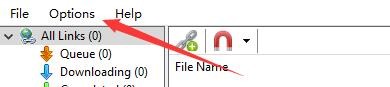
3、在弹出下拉栏中,点击“Settings”
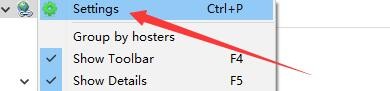
4、在“Settings”窗口中,点击“Check for updates automatically”

5、点击“OK”即可

阅读量:182
阅读量:179
阅读量:184
阅读量:102
阅读量:188
1、点击“TinyDownloader”
2、在“TinyDownloader”窗口中,点击“Options”
3、在弹出下拉栏中,点击“Settings”
4、在“Settings”窗口中,点击“Check for updates automatically”
5、点击“OK”即可